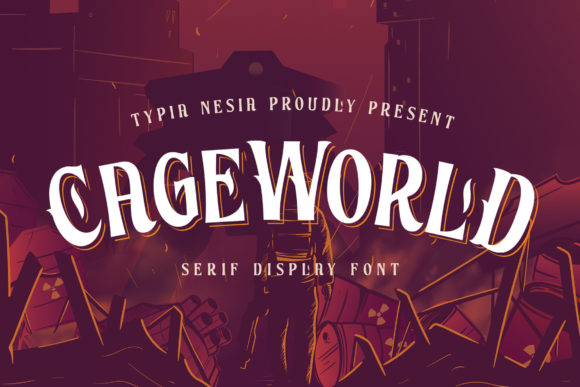
Cageworld: A Vintage Display Font for Web Design
As a web designer, I’m always on the lookout for fonts that bring personality to a site without sacrificing usability. Cageworld is one of those rare finds—a handcrafted display font with a vintage charm that feels both authentic and modern. It’s perfect for adding a nostalgic flair to headers, hero sections, and digital branding without overwhelming the design.
First Impressions: A Vintage Touch for Digital Spaces
I first tested Cageworld while working on a boutique online store’s homepage. The goal was to create a warm, inviting atmosphere that felt handmade and personal. I used it for the main headline and a call-to-action button, and it immediately added a sense of character. The subtle imperfections in the letterforms gave it a tactile quality, like something you’d find in a vintage shop or a well-loved journal.
The font has a slightly uneven baseline, which makes it feel more organic than the rigid precision of most digital typefaces. It works especially well when paired with soft textures or muted color palettes, creating a cohesive aesthetic that feels intentional and thoughtful.
Web Usability: Readability and Responsive Performance
One of the biggest concerns with decorative fonts is how they perform on different screen sizes and devices. Cageworld holds up surprisingly well on mobile screens, as long as it’s used for short phrases and headlines. I found it most effective at larger sizes—think 36px and above—where the details of the letters can be appreciated without becoming hard to read.
On smaller buttons or navigation elements, it can become too ornate. For these cases, I recommend using a simpler sans serif font alongside Cageworld. That way, the design remains accessible while still maintaining a unique visual identity.
Design Applications: From Hero Sections to Branding
Cageworld shines in areas where bold, expressive typography is needed. I’ve used it for hero section headlines, product banners, and even social media graphics. Its retro vibe pairs well with minimalist layouts, helping to draw attention without cluttering the space.
For example, on a creative portfolio site, I used Cageworld for the project titles and overlayed them on background images. The result was a clean yet dynamic look that felt fresh and original. It also worked well as a logo font for a small business that wanted to convey a sense of craftsmanship and nostalgia.
When designing a landing page for a new course, I used Cageworld for the main headline and subheadings. It helped set the tone for the content, making the page feel more approachable and human. The font’s irregularities didn’t detract from its legibility, which is a big plus for web use.
Font Pairing: Balancing Style with Function
Pairing Cageworld with other fonts is key to making it work in a web design. I often pair it with a clean, modern sans serif like Open Sans or Lato for body text. This contrast helps keep the design balanced and readable while letting Cageworld stand out where it matters most.
For editorial-style sites, a simple serif font like Georgia or Merriweather can complement Cageworld nicely. It adds a bit of sophistication without overpowering the display font. In more playful designs, a handwritten or script font might work well as a secondary element, but I’d advise against using more than two decorative fonts in the same layout.
Technical Considerations: Webfont Availability and Licensing
Before integrating Cageworld into any project, I always check the available file formats and licensing options. It’s important to ensure that the font is properly licensed for commercial use, especially if it’s going to be used on a client site or an online store.
Most display fonts come with webfont support, which is essential for ensuring consistent rendering across different browsers and devices. I made sure to include the necessary @font-face declarations and test the font on multiple platforms to confirm its performance.
Another thing to consider is multilingual support. While Cageworld may not have full coverage for all languages, it generally handles English and some common European languages well. If your site targets a global audience, this is worth verifying before finalizing the design.
Final Thoughts: A Unique Asset for Creative Web Projects
Cageworld is more than just a pretty font—it’s a tool that can elevate the visual identity of a website. Its vintage aesthetic brings a sense of warmth and authenticity that many modern fonts lack. Whether you’re building a boutique online store, a creative portfolio, or a branded landing page, Cageworld offers a refreshing alternative to the usual digital typefaces.
It’s not a font for every situation, but when used thoughtfully, it can make a big difference. Just remember to balance its decorative qualities with readability and accessibility, and you’ll be well on your way to creating a visually compelling and user-friendly web experience.